foreach
原文
foreach一共有三种类型,分别为List,array,Map三种
foreach 属性
| 属性 |
描述 |
|---|
| item |
循环体中的具体对象。支持属性的点路径访问,如item.age,item.info.details。
具体说明:在list和数组中是其中的对象,在map中是value。
该参数为必选。 |
| collection |
要做foreach的对象,作为入参时,List<?>对象默认用list代替作为键,数组对象有array代替作为键,Map对象没有默认的键。
当然在作为入参时可以使用@Param("keyName")来设置键,设置keyName后,list,array将会失效。 除了入参这种情况外,还有一种作为参数对象的某个字段的时候。举个例子:
如果User有属性List ids。入参是User对象,那么这个collection = "ids"
如果User有属性Ids ids;其中Ids是个对象,Ids有个属性List id;入参是User对象,那么collection = "ids.id"
上面只是举例,具体collection等于什么,就看你想对那个元素做循环。
该参数为必选。 |
| separator |
元素之间的分隔符,例如在in()的时候,separator=","会自动在元素中间用“,“隔开,避免手动输入逗号导致sql错误,如in(1,2,)这样。该参数可选。 |
| open |
foreach代码的开始符号,一般是(和close=")"合用。常用在in(),values()时。该参数可选。 |
| close |
foreach代码的关闭符号,一般是)和open="("合用。常用在in(),values()时。该参数可选。 |
| index |
在list和数组中,index是元素的序号,在map中,index是元素的key,该参数可选。 |
List测试
Array大同小异
SQL
 1
 2
 3
 4
 5
 6
 7
 8
 9
10
11
12
13
|
drop table users if exists;

create table users (
  id int,
  name varchar(20)
);

insert into users (id, name) values(1, 'User1');
insert into users (id, name) values(2, 'User2');
insert into users (id, name) values(3, 'User3');
insert into users (id, name) values(4, 'User4');
insert into users (id, name) values(5, 'User5');
insert into users (id, name) values(6, 'User6');
|
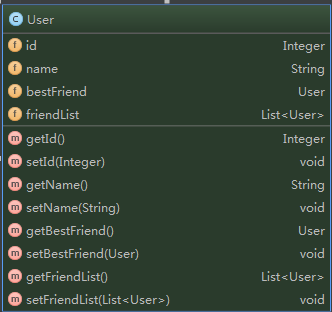
User类
 mapper.xml
1
2
3
4
5
6
7
8
9
|
<select id="countByUserList" resultType="_int" parameterType="list">
select count(*) from users
  <where>
    id in
    <foreach item="item" collection="list" separator="," open="(" close=")" index="">
      #{item.id, jdbcType=NUMERIC}
    </foreach>
  </where>
</select>
|
测试代码
 1
 2
 3
 4
 5
 6
 7
 8
 9
10
11
12
13
14
15
16
17
|
@Test
public void shouldHandleComplexNullItem() {
    SqlSession sqlSession = sqlSessionFactory.openSession();
    try {
        Mapper mapper = sqlSession.getMapper(Mapper.class);
        User user1 = new User();
        user1.setId(2);
        user1.setName("User2");
        List<User> users = new ArrayList<User>();
        users.add(user1);
        users.add(null);
        int count = mapper.countByUserList(users);
        Assert.assertEquals(1, count);
    } finally {
        sqlSession.close();
    }
}
|
测试日志
1
2
3
|
DEBUG [main] - ==>  Preparing: select count(*) from users WHERE id in ( ? , ? )
DEBUG [main] - ==> Parameters: 2(Integer), null
DEBUG [main] - <==      Total: 1
|
Map
Map类型没有默认的map,所以不能直接写死collection="map",如果这么写,需要保证传入的Map参数有@Param("map")注解。
map和List,array相比,map是K,V存储的,在foreach中,使用map时,index属性值为map中的Key的值。
因为map中的Key不同于list,array中的索引,所以会有更丰富的用法。
一个简单的例子
1
2
3
4
5
6
|
<insert id="ins_string_string">
    insert into string_string (key, value) values
    <foreach item="item" index="key" collection="map"
        open="" separator="," close="">(#{key}, #{item})
    </foreach>
</insert>
|
可以看出这个例子相当简单,表中需要两个值,正好和K,V对应,因而map中的一个K,V就对应一条数据,如果map中有多个K,V,那么久会保存多个结果。
如果Map中有两对K,V,那么会执行SQL如下:
1
2
3
|
DEBUG [main] - ==>  Preparing: insert into string_string (key, value) values (?, ?) , (?, ?)
DEBUG [main] - ==> Parameters: key 1(String), value 1(String), key 2(String), value 2(String)
DEBUG [main] - <==    Updates: 2
|
下面再看一个select的例子
1
2
3
4
5
6
|
<select id="sel_key_cols" resultType="int">
    select count(*) from key_cols where
    <foreach item="item" index="key" collection="map"
        open="" separator="AND" close="">${key} = #{item}
    </foreach>
</select>
|
可以看出这里用key=value来作为查询条件,对于动态的查询,这种处理方式可以借鉴。一定要注意到\$和#的区别,\$的参数直接输出,#的参数会被替换为?,然后传入参数值执行。
上述SQL执行日志如下:
1
2
3
|
DEBUG [main] - ==>  Preparing: select count(*) from key_cols where col_a = ? AND col_b = ?
DEBUG [main] - ==> Parameters: 22(Integer), 222(Integer)
DEBUG [main] - <==      Total: 1
|